The Processing report essentially helps a user keep a pulse on the merchant accounts, what ratios are at and monitoring limits.
From the CRM menu, go to Reports > Processing.

1. Select the site(s) that you need to query
2. Select a date range
3. Click Search
Results:
Charts & Graphs:
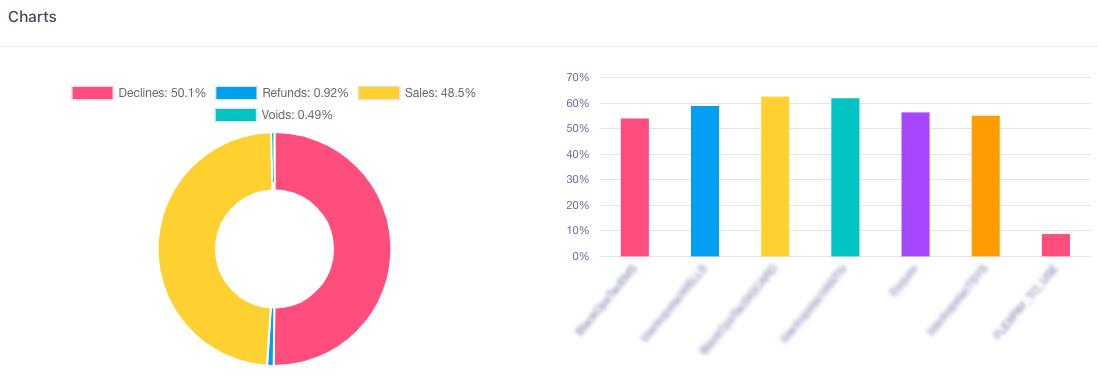
The processing charts present a graphical representation of the sales, refunds, voids, and declines of all your transactions that have occurred through your merchant accounts.
-
The pie chart shows yours sales, voids, refunds, and declines percentage for all your transactions.
-
The Processing limits graph shows how much of the total processing limit your merchant accounts have processed. When merchant accounts have reached their maximum processing limit, the bar turns red.
Hover over each bar to determine which merchant account the bar represents
The Processing Details section provides the actual number of PENDING AUTHS, SALES CAPTURE, REFUNDS, VOIDS, and DECLINES that have occurred within your merchant accounts.
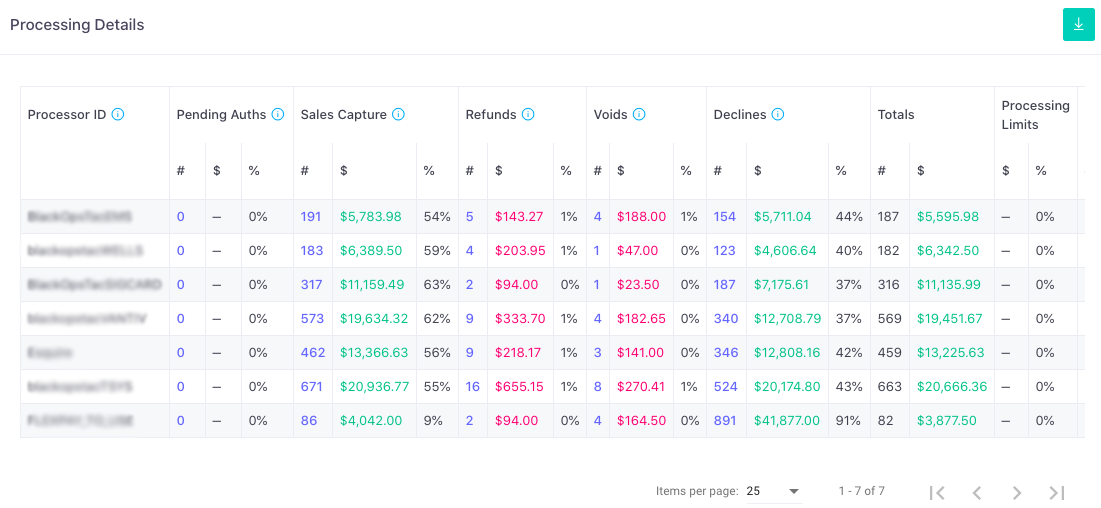
If you click on the hyperlinked results, a pop up will occur with all the transactions under that category and can be downloaded.
Note: The Processing Report ONLY shows the refunds/voids of orders that occurred in the date range selected, while the Transaction Report shows RAW DATA that falls into the date range selected. It also reports the voids/refunds that were attempted and failed. Do not use the Transaction Report as a comparison tool to the other reports.
List of Terms:
Processor ID: Name of a specific processor that is passed to the payment gateway.
Pending Auths: Transactions that has been approved for a specified amount without posting to the bank account. A capture is required to complete the sale.
Sales/Capture: All approved transactions in the date range.
Refunds: Sale transactions that are refunded
Voids: Sale transactions that are canceled prior to settlement of the transaction
Declines: Sale transactions that failed authorizations
Chargebacks: Chargeback ratio of each individual processor by chargeback:transaction count as well as chargeback:sale amount.
Alerts: Count of Alerts received